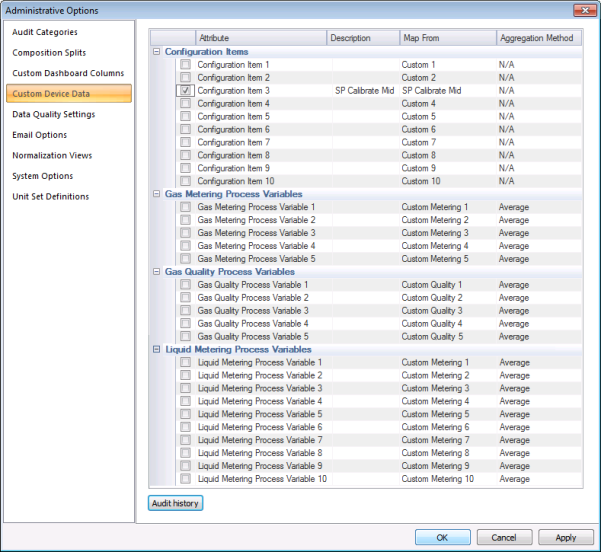
Use the Custom Device Data page to define custom device data mapping details. Custom device data can be mapped into a finite number of available data item fields, to mitigate the need for additional data items. Customizable attribute types include configuration items, gas metering process variables, gas quality process variables, and liquid metering process variables. The meaning of the configuration item or process variable is defined so that users detect no difference between a custom configuration item or process variable and a standard configuration item or process variable in the measurement system. Special considerations may apply when exporting raw data. You can also access audit history information from this page.
You must have proper security authorization to configure custom device data attributes. See FMS Security (and ACCESS security event) for information about configuring security access to administrative options.
On the Admin menu, click Options, then Custom Device Data to enable and map the Custom Device Data attributes to specific items configured for your system. Attribute types available for custom mapping include Configuration Items (10), Gas Metering Process Variables (5), Gas Quality Process Variables (5), and Liquid Metering Process Variables (10).
The properties for the Custom Device Data page of the Administrative Options dialog box are described below.
|
Parameter |
Description |
|---|---|
| [Custom Device Data list] | |
|
|
Click the check box to indicate that the configuration item or process variable is in use. |
|
Attribute |
Customizable configuration attributes available in the measurement system are as follows:
When enabled, custom configuration item values can be viewed in the Configuration control (Configuration data view). See FMS Configuration Items for more information about available data items. Customizable process variable attributes available in the measurement system are as follows:
When enabled, custom process variable values can be viewed in the History Grid, History Graph, and Raw Data controls. See FMS History Items for more information about available data items. Note: When exporting raw data, special considerations may apply. |
|
Description |
Specifies a description for the selected device data attribute. When you select custom device data attributes (Configuration items or Gas Metering / Gas Quality / Liquid Metering process variables) for use, the description field is enabled. Type a description into the text box. The description entered will then appear as the data item name, and will be available for display wherever other configuration/GM/GQ item descriptions can be viewed or selected. |
|
Map From |
Select the FMS enumeration value from which data will be mapped into the selected configuration item or process variable field. See EFM Data Items for more information. |
|
Aggregation Method |
For each custom process variable in use, select an aggregation method. Aggregation options for Gas Metering Process Variable and Gas Quality Process Variable data items are as follows.
Aggregation options for Liquid Metering Process Variable data items are as follows.
Note: The Aggregation Method field does not apply to Configuration Items. See CygNet Measurement Data Calculation for more information about aggregation methods. |
|
Audit history |
Click Audit history to view the Audit History for the selected custom device data item. See Viewing Audit History for more information. |

When exporting raw data, special considerations may apply to the mapping of data items to available custom fields in the export file.
When exporting raw data to Flow-Cal .cfx files using the optional Export: Flow-Cal Data CFX command, custom FMS device data is mapped to available custom CFX fields in the CygNet command definition file. See Configuring Export Flow-Cal Data CFX Commands for more information about editing or customizing the command definition file.
Note: The Export: Flow-Cal Data CFX command is provided as an optional feature. The CxFmsFlowCalExport.dll file must be included and registered in the Support folder on your host server for this command to function.
See Installing CygNet Measurement for more information about installation and registration of this file.
CygNet Measurement provides 10 customizable Configuration Items, 5 customizable periodic Gas Metering Process Variables, 5 customizable periodic Gas Quality Process Variables, and 10 customizable periodic Liquid Metering Process Variables.
Custom FMS Configuration data items (1-10) can all be mapped for export. See FMS Configuration Data Items for information about valid data items.
Custom FMS History data items for periodic gas metering (1-5), periodic liquid metering (1-10), and/or periodic gas quality (1-5) can be mapped for export as follows. See FMS History Data Items for information about valid data items.
|
|
|


